Private Endpoints for Azure Storage: closing the public front door
the problem
Every storage account you create ships with a public endpoint. Firewall rules and “selected networks” narrow who can reach it, but the endpoint itself stays on the internet, resolvable and probeable. For anything holding regulated data, the cleaner answer is to remove the public path entirely and reach the account over a private endpoint inside your VNet.
The switch sounds trivial. It isn’t, because the moment you flip publicNetworkAccess to Disabled, every client that still resolves the public IP breaks — including your own pipelines.
target architecture
One private endpoint in a dedicated subnet, one private DNS zone linked to the VNet, public access off. Clients inside the VNet (or connected via VPN/ER) resolve the account to a private IP; everyone else gets nothing.
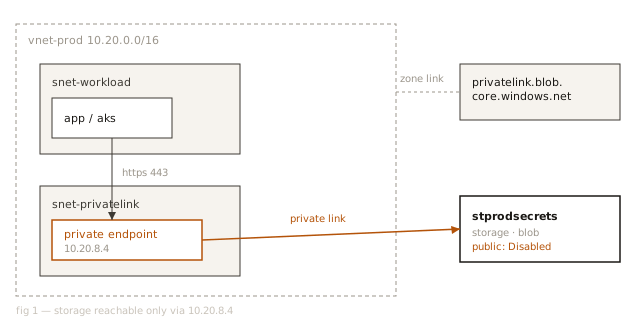
dns is the hard part
Private endpoints don’t change what the account is called, only what the name resolves to. That resolution flip happens in the privatelink.blob.core.windows.net zone. If the zone isn’t linked to every VNet that needs access — hub, spokes, the VNet your build agents live in — those networks keep resolving the public IP and fail closed once you disable public access. Audit the zone links before the cutover, not after.
bicep
The endpoint, the zone group that writes the A-record, and the lockdown itself:
resource pe 'Microsoft.Network/privateEndpoints@2023-11-01' = {
  name: 'pe-stprodsecrets-blob'
  location: location
  properties: {
    subnet: { id: privatelinkSubnetId }
    privateLinkServiceConnections: [{
      name: 'blob'
      properties: {
        privateLinkServiceId: storage.id
        groupIds: ['blob']
      }
    }]
  }
}
Then, and only then, close the front door:
properties: {
  publicNetworkAccess: 'Disabled'
  networkAcls: {
    defaultAction: 'Deny'
    bypass: 'AzureServices'  // only if you truly need it
  }
}
verifying the lockdown
From inside the VNet, the name should resolve to the endpoint’s private IP. From anywhere else, connections should be refused at the network layer, not the auth layer:
$ dig +short stprodsecrets.blob.core.windows.net
stprodsecrets.privatelink.blob.core.windows.net.
10.20.8.4

# from outside the vnet
$ az storage blob list --account-name stprodsecrets ...
(ConnectionError) public network access is disabled
A refused connection is the success state here. If you get a 403 instead, traffic is still arriving over the public endpoint and only auth is stopping it.