Your DNS policy? My DNS Policy
# before
$ dig +short probe.lab.internal
192.0.2.53

# after
$ dig +short probe.lab.internal
blockpolicy.azuredns.invalid.
Nothing changed inside the VNet. No NSG, no route table, no resolver, no VM configuration. The object that changed the answer lives in a different Entra tenant, and the subscription owning the VNet logged no link operation for it. Because it cannot by design.
This is the third part of the Azure DNS ecosystem I have put through the same test: a child resource created in tenant B that references a VNet in tenant A. A private DNS zone, you can compare it with an address book: The attack worked, no way to detec. A forwarding ruleset, you can compare it with a pipeline that determines how requests flow: Attack worked, only way to detect it is in the DNSQueryLogs if an attacker starts to manipulate the DNS flow. A DNS resolver policy, a DNS security policy, sits in front of our pipeline. It watches queries, logs and decide which queries to block. And you don’t want an attacker to decide which DNS queries get blocked. Logging is also not optimal.
what a DNS security policy can do
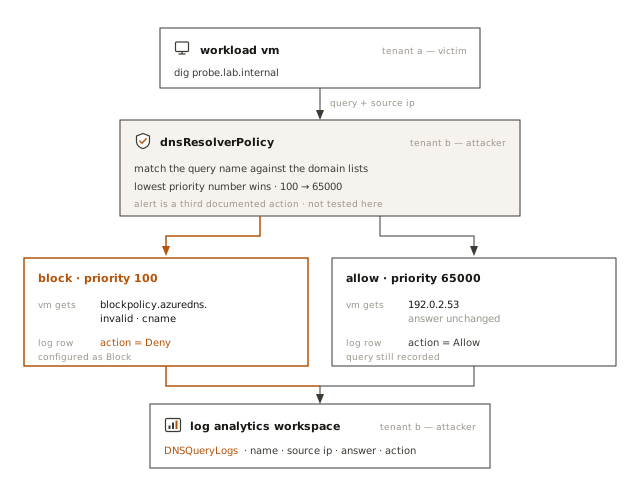
A DNS resolver policy sits in front of Azure-provided DNS for a linked VNet. It carries domain lists, and traffic rules that match those lists and apply Allow, Block or Alert, at priorities from 100 to 65000 where the lower number wins. Attach a diagnostic setting and every matched query lands in DNSQueryLogs with the name asked, the source address, the rule that fired and the answer returned.
Two interesting resource constraints:
- The policy and the VNet must sit in the same region
- a VNet can have exactly one resolver policy association.
basic setup
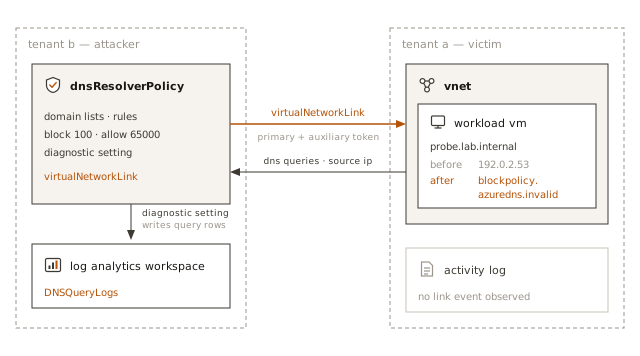
Everything except VNet and my test VM is in tenant B: the policy, the domain lists, the rules, the diagnostic setting and the Log Analytics workspace that receives the queries. Tenant A contributes the network and the workload to simulate traffic.
The link itself is as with our other DNS resources a child of the policy, not of the VNet. The asymetry we exploited in the past will be exploited again: an Azure resource’s write is logged against the resource, and the DNS resolver policy belongs to the attacker, not the victim.
how to reproduce
PUT https://management.azure.com/subscriptions/<policy-sub>/resourceGroups/<policy-rg>/providers/Microsoft.Network/dnsResolverPolicies/<policy>/virtualNetworkLinks/<link>?api-version=2025-05-01
Authorization: Bearer <policy-tenant ARM token>
x-ms-authorization-auxiliary: Bearer <vnet-tenant ARM token>
Content-Type: application/json
{
  "location": "<same-region-as-vnet>",
  "properties": {
    "virtualNetwork": {
      "id": "/subscriptions/<vnet-sub>/resourceGroups/<vnet-rg>/providers/Microsoft.Network/virtualNetworks/<vnet>"
    }
  }
}
Events in each tenant
Tenant B’s Activity Log has the whole series of events, attributed to the identity that triggered it:
Microsoft.Network/dnsResolverPolicies/virtualNetworkLinks/write
Started → Accepted → Succeeded
An Azure Activity Log query in tenant A returned nothing corresponding. I didn’t find anything in the resource graph either. But of course that doesn’t mean there isn’t a way to detect this. If you know one, I’d like to hear about it.
Logging and blocking
I set up a diagnostic settings policy on the DNS Resolver Policy and sent allLogs to a Log Analytics Workspace in tenant B, then I added a catch-all domain list matching the root zone (.) and a low-precedence Allow rule, so every query got an explicit rule classification instead of none. The VM in tenant A then sent unique queries I’d later identify in the logs.
No surprise, the queries landed in the LA workspace in tenant B.
The block test used one narrow hostname, at high precedence, on top of the catch-all Allow. The block actually worked. One aside, a Block in a resolver policy is a deny in the query logs if you want to build KQL rules referencing them.
before   probe.lab.internal → 192.0.2.53
         ResolverPolicyRuleAction = Allow

after    probe.lab.internal → CNAME blockpolicy.azuredns.invalid.
         ResolverPolicyRuleAction = Deny
what is the risk?
Confidentiality. The attacker setting up their own DNS resolver policy receives query names and source addresses from a workload in a network they do not own, which is a great way to learn more about the victim and map their digital estate.
Availability. Blocking DNS resolution is unfortunately a good way to DoS a target. Especially because an attacker can do this very selectively.
one shot to detect (and prevent)
You might have noticed that I did not log the DNS query logs on the side of the victim to explore if attacker infrastructure shows up there. The reason is very simple: The attacker owns the infrastructure that does the logging and only one per Vnet is allowed. Which is our best shot to prevent this specific attack. If you set up DNS resolver policies for all your Vnets, no attacker can do that for you. You should set them up in any case. DNS query logs are verbose but you can choose what to log or even enable ad hoc logging in an IR scenario. Trying to set up a DNS resolver policy is also the only way I can come up with to determine if an attacker has set up one. If it fails because there already is one and it’s not yours, you know you should probably call Microsoft.
next
The ruleset boundary in the previous experiment did not behave the way the documentation led me to expect, so the next question is where the boundary actually is: can a DNS Private Resolver itself (and the subnets its inbound and outbound endpoints are delegated into) reference a VNet in another tenant, rather than just its ruleset? What about the other DNS resources we have left? Can an attacker silently abuse them? And what would be the impact. By the way: All these cross tenant scenarios are interesting because they leave no trace but even a case where an attacker gains access to a subscription in your tenant and sets up that infrastructure there is probably not something most security teams have blocked or would detect.