When a foreign Private DNS zone answers inside your VNet
three months later
A developer working on Azure gets compromised via AitM phishing. You catch it: the sign-in is anomalous, the session gets revoked, all credentials are rotated, the device is reimaged. You enumerate what their identity can reach, you look for malicious activity and find that the attacker acted similar to you, they also enumerated permissions and looked up the infrastructure the developer was working on. But only that, no write operations. You close the ticket and move on to the next. Infostealer, boring.
Three months later, your Azure workloads start crashing. It looks like DNS. A name your platform depends on resolves to an address that has never hosted it. Clients fail closed on the certificate. Nobody deployed anything. The VNet’s DNS settings are the same they were yesterday. You list every Private DNS zone in every subscription you own and none of them holds the name. Resource Graph returns nothing. The Activity Log shows nothing.
The answer is coming from a Private DNS zone in a tenant you have never heard of, linked to your VNet during that incident you can barely remember that happened 3 months ago.
This scenario is invented. But the attack is very possible and raises the question: what can cloud responders do if there are no logs by design?
the problem
Azure doesn’t really see tenant boundaries in many cases, a subscription is a subscription. If you can deploy cross subscription setups in the same tenant, why not across tenants? A Private DNS zone living in, say, Bob’s tenant B can be linked to a virtual network living in tenant A owned by Alice. This is documented, supported, and genuinely useful for multi-tenant architectures. It also produces an asymmetry worth understanding that can be exploited by attackers.
The link object describing the Vnet <-> DNS zone link is a child resource of the DNS zone. It lives in tenant B. Tenant A’s VNet is only referenced by it. This means: the write is logged in Bob’s tenant, the infrastructure definition describing that the write happened lives there, as do the APIs you can use to list this infrastructure.
my test
I explored this exact scenario in my lab across 2 tenants. Tenant B saw the link creation in its Activity Log and could enumerate the link in the Azure Resource Graph. Tenant A, the VNet owner, got no Activity Log event on the VNet, its resource group, or its subscription when the link was created. The Resource Graph returned nothing. I could see the link’s effects with DNS query logging, but the resulting log row named the queried namespace, not the Azure resource, subscription or tenant answering for it.
It looks to me as if any identity with the permission Microsoft.Network/virtualNetworks/join/action on Alice’s Vnet can set this up.
how I set up the link
My first attempt failed with LinkedAuthorizationFailed. Which is interesting because the identity had permissions on both resources. But the request carried a token from only one tenant.
A single ARM request that writes a resource in one tenant while referencing a resource in another needs proof of authorisation from both. ARM handles this via auxiliary authorisation, so we need a second bearer token in its own header:
Authorization: Bearer <token-issued-by-zone-tenant>
x-ms-authorization-auxiliary: Bearer <token-issued-by-vnet-tenant>
Both tokens are audience-scoped to ARM. The primary belongs to tenant B, because the write lands beneath tenant B’s zone. The auxiliary proves the same identity may join the VNet in tenant A.
With both in place, a raw PUT against the link resource succeeds:
PUT /subscriptions/<zone-sub>/resourceGroups/<zone-rg>/providers/
    Microsoft.Network/privateDnsZones/<zone>/virtualNetworkLinks/<link>
    ?api-version=2024-06-01
{
  "location": "Global",
  "properties": {
    "virtualNetwork": {
      "id": "<full-arm-resource-id-of-the-tenant-A-vnet>"
    },
    "registrationEnabled": false
  }
}
That id is the VNet’s full ARM resource ID. The portal and az network private-dns link vnet create do not do support this.
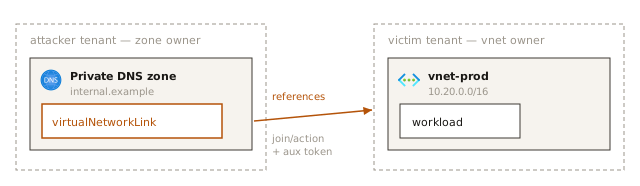
what is a private DNS zone and what can an attacker do with it?
Strip it back and the link grants one capability: the right to answer DNS queries your workloads ask for every client resolving through 168.63.129.16. There are no Azure side checks on its records. As long as it is an IP address it is a valid answer. With this an attacker can severly impact availability by answering DNS queries wrong your workloads depend on. What makes it worth calling out is the impossibility to figure out what is going on based on the DNS query logs. The owner of tenant A only sees the answers but nothing linking them to the malicious DNS zone in tenant B.
Redirection is the obvious next step: point a name your workloads call at an address the attacker chooses. Two constraints decide how far it goes.
The first is reachability. The answer has to be somewhere the workload can actually get to: a host inside your address space they already hold, something across a peering, or a public IP if egress permits it. Another argument for tight egress controls.
The second is TLS. A hijacked name does not come with a certificate for it, so a client that validates properly refuses the connection and the interception degrades into the outage above. The exposure concentrates in what does not validate: plaintext protocols, internal HTTP between services, clients with verification switched off, and anything that sends a credential before it checks who answered. Which is unfortunately still a lot of infrastructure in use today, think SQL servers.
There is also an impact to confidentiality not yet covered above: A VNet link can be created with registrationEnabled: true. Azure then writes an A record for every VM in the network, hostname to private IP, into the linked zone, maintaining it as machines come and go. Point that at a foreign zone and your VNet inventory keeps itself current inside somebody else’s tenant.
The constraint is that a VNet can hold only one autoregistration-enabled link at a time. If you already have one, the attacker’s cannot register.
What the attacker does not get is the queries themselves. Private DNS zones expose query volume as an aggregate, zone-level metric, not per-query logs, so the zone owner learns that their zone is being used and roughly how much, but not which host asked for what. Both ends of this link are kind of half-blind, which is a strange asymetry.
what each tenant sees
bob: the zone owner
Tenant B gets a clean Activity Log event for Microsoft.Network/privateDnsZones/virtualNetworkLinks/write, carrying the caller’s object ID in tenant B, the client application ID, caller IP, and an identityprovider claim pointing at the caller’s home tenant.
alice: the vnet owner
Nothing.
No Activity Log event on the VNet, the resource group, or the subscription for the tested operation.
Referencing a VNet creates no ARG-visible backlink in the VNet owner’s scope. I looked into Vnet related APIs to see if they provide a way to get data on the link but no luck.
what the data plane gives you back
If the control plane is silent, the question becomes whether the VNet owner can at least see the link being used. It can, with instrumentation that has to exist beforehand.
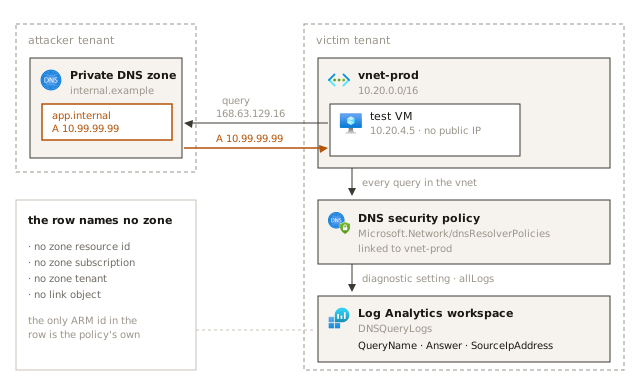
I kept the cross-tenant link in place and built local telemetry in tenant A: a DNS resolver policy (Microsoft.Network/dnsResolverPolicies) in the VNet’s region, linked to the VNet, with a diagnostic setting shipping allLogs to Log Analytics. Then a test VM with no public IP, an A record added to the foreign zone pointing at 10.99.99.99, and a query from the VM through Azure DNS at 168.63.129.16.
The record resolved. The decisive DNSQueryLogs row:
| field | value |
|---|---|
QueryName | the full FQDN in the foreign namespace |
QueryType | A |
ResolutionPath | PrivateDnsResolution |
ResolverPolicyRuleAction | Allow |
Answer | the A record — 10.99.99.99 |
SourceIpAddress | the test VM’s private IP |
VirtualNetworkId | the local VNet |
ResolverPolicyId | tenant A’s own resolver policy |
That answers three operational questions: private DNS was used, this workload asked, this answer came back. It does not answer the one that matters for attribution. There is no PrivateDnsZoneId, no zone subscription, no zone tenant, no foreign resource identifier of any kind. The only Azure resource ID in the row is my own resolver policy.
what we can do
identity hygiene
The earliest useful control is to secure authorization and authentication for developers holding Azure roles containing this action:
Microsoft.Network/virtualNetworks/join/action
Eight built-in roles name it outright. Two of them read as DNS or directory roles rather than network roles, which is exactly the kind of assignment that survives a review of who can touch the network:
| role | role definition id |
|---|---|
| Azure Container Storage Operator | 08d4c71a-cc63-4ce4-a9c8-5dd251b4d619 |
| Azure Local Migrate Owner | fd8ea4d5-6509-4db0-bada-356ab233b4fb |
| Azure Migrate Owner | fd8ea4d5-6509-4db0-bada-356ab233b4fa |
| Azure Migrate Decide and Plan Expert | 7859c0b0-0bb9-4994-bd12-cd529af7d646 |
| Azure Red Hat OpenShift File Storage Operator | 0d7aedc0-15fd-4a67-a412-efad370c947e |
| Azure Red Hat OpenShift Image Registry Operator | 8b32b316-c2f5-4ddf-b05b-83dacd2d08b5 |
| Domain Services Contributor | eeaeda52-9324-47f6-8069-5d5bade478b2 |
| Private DNS Zone Contributor | b12aa53e-6015-4669-85d0-8515ebb3ae7f |
Another six get there through a wildcard, so an audit that greps role definitions for the literal action string misses every one of them — including the two everybody actually has assigned:
| role | covers it via | role definition id |
|---|---|---|
| Owner | * | 8e3af657-a8ff-443c-a75c-2fe8c4bcb635 |
| Contributor | * | b24988ac-6180-42a0-ab88-20f7382dd24c |
| Service Group Administrator | * | 4e50c84c-c78e-4e37-b47e-e60ffea0a775 |
| Service Group Contributor | * | 32e6a4ec-6095-4e37-b54b-12aa350ba81f |
| Network Contributor | Microsoft.Network/* | 4d97b98b-1d4f-4787-a291-c67834d212e7 |
| SQL Managed Instance Contributor | Microsoft.Network/virtualNetworks/* | 4939a1f6-9ae0-4e48-a1e0-f2cbe897382d |
Built-in role definition ids are the same GUID in every tenant, so they are usable as-is in a query. To rebuild both lists in your own tenant with custom roles included:
az role definition list --scope "/subscriptions/<sub-id>" -o json | jq -r '
  def covers($a): $a == "Microsoft.Network/virtualNetworks/join/action"
    or ($a | endswith("*"))
       and ("Microsoft.Network/virtualNetworks/join/action" | startswith($a | rtrimstr("*")));
  .[] | select(any(.permissions[].actions[]; covers(.)))
      | [.roleName, .roleType, .name] | @tsv'
That resolves trailing wildcards and ignores notActions, which is enough for a review list and not enough to call it a policy engine.
Review assignments to guest users, foreign service principals and automation identities at subscription, resource group and VNet scope. Anything with broad network rights probably has this action whether or not anyone meant to authorise cross-tenant DNS links. Custom roles scoped narrowly are worth the effort here.
Enforce device compliance and Entra join in the Conditional Access policies for developers with critical permissions. Enforce phishing resistant MFA, use authentication contexts with PIM.
pre-link the namespaces you care about
Because a VNet cannot carry two links for the same zone name, every namespace you link yourself is one nobody else can claim. That promotes ordinary hygiene into a preventive control: link the privatelink.* zones for the services you use, plus your own internal namespaces, on the VNets that matter including namespaces you are not using yet but would hate to see hijacked.
use your own DNS
If the VNet’s clients resolve through custom DNS servers that never forward to 168.63.129.16, linked private zones are not consulted at all.
build DNS logging before you need it
A dormant link emits nothing. Detection begins the first time a workload asks for a matching name, and only if logging was already there. Resolver policy and diagnostics are a build-time decision, not an incident-time one.
hunt for private resolution outside your inventory
PrivateDnsResolution on its own is not suspicious — every legitimate zone in your own tenant produces it, and the log will not tell you who owns the zone. The workable strategy is an authoritative inventory of approved private namespaces, and an alert on private resolution outside it:
let approved = dynamic([
    "privatelink.blob.core.windows.net.",
    "corp.example.",
    "internal.cloudapp.net."
]);
DNSQueryLogs
| where ResolutionPath == "PrivateDnsResolution"
| extend name = strcat(trim_end(@'\.+$', tolower(QueryName)), '.')
| mv-apply zone = approved to typeof(string) on (
    summarize hits = countif(name == zone or name endswith strcat(".", zone))
  )
| where hits == 0
| project TimeGenerated, name, QueryType, Answer, SourceIpAddress, VirtualNetworkId
Generate those predicates from a Sentinel watchlist rather than embedding a list in every rule, and tune the Azure-generated namespaces to your estate. Understand what the rule is: behavioural context, not ownership proof. A foreign zone using an approved-looking namespace slips past it, and a legitimate unregistered namespace trips it.
treat the result as behaviour, not attribution
The alert tells a responder which name was queried, which workload queried it, and what came back. From the log row alone it cannot name the zone, subscription or tenant that answered. You could try to create a private DNS zone for names you suspect have been squatted and link them to your Vnet. If it doesn’t work there is another piece of evidence pointing towards malicious activity.
takeaway
This cross-tenant visibility gap is concerning and I don’t see a 100% fix on the customer side for it. I personally think this is something Microsoft has to secure. Identity compromises are a daily occurence. Defenders should be enabled to detect what an attacker did and eradicate their presence from our environment.